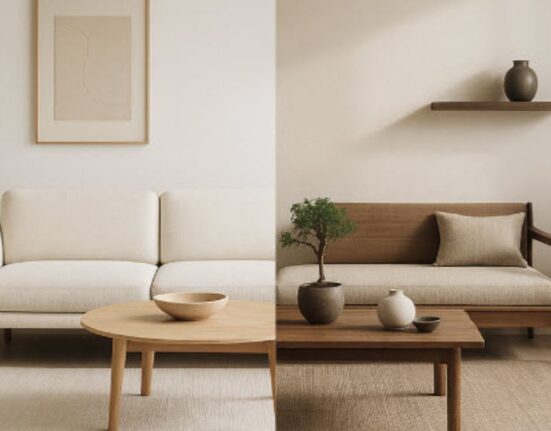


Ever dreamt of being able to redesign your space within an hour, seeing actual designs that will work with the room’s dimensions, colors and furniture?
Well, that wish comes true with the power of modern AI interior designers for Americans in 2026. This blog provides you with all the information you need about the best AI interior designer tools currently on the market including their functionality and how to select the right one for your needs.
Why AI matters now
The use of AI is no longer limited to gimmicky solutions; it is now becoming an effective aid in making our lives easier when dealing with home renovations. It can help us save time in generating ideas, visualizing spaces, trying out different finishes, and avoiding expensive errors through realistic images before buying anything. This is definitely going to be useful for American homeowners in big-box retailers.
The top kinds of AI tools homeowners use
Redecorating rooms: Capture an image, pick a style (modern, farmhouse, beachy, etc.), then receive several redesigns with suggestions for furniture, colors, and decor. Fastest options for one-room makeovers.
Floor planners: Transform room images or even simple measurements into a layout that will help with furniture arrangement and maximize space without having to move anything around.
3D Visualizers & Renderers: Generate photorealistic pictures or even short animations so that you can see how the lighting, materials, and finish work during various times of the day.
Furniture & decor sourcing assistants: Find sources for suggested items along with pricing information, usually with comparison features, particularly those targeting U.S. shoppers.
Style/Moodboard creators: Provide style inspiration through reference images or home-celebrity inspirations and create a shopping list based on your taste.
What homeowners are looking for
There are three things that the homeowners expect to see from the design tool, a realistic visualization, an easy editing process, and affordability. The software should provide a realistic picture, rather than merely a mock-up, allow for making changes to any item or changing styles easily, and link concepts with actual products available for purchase at American stores.
How to choose the right tool
- First identify your primary purpose (visually imagine vs. plan vs. shop).
- Give preference to photorealism when the decision will be largely related to finishing (paints, flooring), while focus on intelligent layout decisions when planning your room.
- Consider compatibility with devices you have: smartphone apps and browser-based tools will let you start from photos of your room, while desktop applications provide additional precision.
- Retail partnerships might be necessary in case you plan to shop directly through the app.
- Test out free trials on your smaller projects.
A simple 4-step workflow that works
- Take a photo of your room during the daytime with both a full view and a corner to corner view.
- Upload the image into the AI software and specify the dimensions (if available) along with the desired style.
- Select between two to four designs suggested by the AI software and edit them through color changes or rearrangement.
- Download the product list, dimensions, and photorealistic view of your room design.
Comparing typical features
Ease of use: Most homeowner-oriented software is oriented towards guided instructions and restyling with just a single click.
Photorealism: Better-quality software produces highly photorealistic renderings with realistic lighting; cheaper versions are more styled.
Room awareness: Programs that allow room dimensions or scans using LiDAR technology produce furniture layouts that work the best.
Product sourcing: The better versions connect to major stores in the US and include product prices.
Collaborative functionality: Some programs allow you to create versions of your designs and send out links for comparison.
Costs and subscriptions
Both free versions and paid plans exist; homeowners normally pay either on a monthly basis or for each render when requesting a higher quality picture or having the shopping functionality included. Be prepared to pay extra for more realistic renders or 3D model imports; budget-conscious people can do a lot with free or affordable plans too.
Common mistakes and how to avoid them
Using bad photographs: Poorly lit pictures result in poor designs, first ensure that the area is clear and well-lit.
Forgetting to measure: The performance of the AI tool increases when it is given the dimensions of either one of your walls or doors.
Relying too much on the AI: Remember that these are merely recommendations; make changes based on functionality and personal preference.
Neglecting furniture scale: Make sure to always verify the sizes of recommended products.
Privacy and Data Notes
The vast majority of consumers should determine if the application can save pictures and if it can share information with any other companies. One must read basic details about privacy before posting any pictures of their house; one should use those tools that have an option to delete them afterwards.
Final thought
US home owners have the ability through the help of AI tools that help interior designers in 2026 to visualize and be confident about their designs without making any mistake or spending extra money. Do you want me to send you a one page guideline for designing your home?
FAQs
1. How precise is an AI measurement of the room?
The accuracy increases greatly if you provide at least one true measurement; however, most tools can easily scale the others up but make sure to check with a tape measure before ordering anything.
2. Are AI design tools suitable for people who don’t own their houses?
Absolutely, they’ll help you test your interior without making any long-lasting changes, such as choosing movable wallpapers instead of installing tiles.
3. Are these applications available for smartphones?
The vast majority of applications that would be interesting for homeowners allow using them on mobile devices and in your browser; however, some adjustments may work better on computers.
4. Does AI replace the role of a professional designer?
Many elements in designing get much faster due to using AI technology, but there still are some things that require the opinion of an experienced designer, especially concerning complicated issues.
5. How do I choose between a free and paid subscription?
Try using the free version for a single room first and move to a paid version if you want to have better image quality and purchase links.